16-Bit Calculator
Add and subtract two 16-bit numbers in CircuitVerse.
Project overview
Our calculator adds and subtracts two 16-bit numbers, A and B. It is built in CircuitVerse from sixteen one-bit full adders. The carry-out of each adder goes into the carry-in of the next one, starting at bit 0 (the rightmost bit) and ending at bit 15.
A mode switch called M picks the operation. Set M = 0 to add. Set M = 1 to subtract. When M = 1, the circuit flips every bit of B and adds 1, which gives A - B.
The circuit shows a 16-bit result and a carry-out called Cout. In add mode, Cout = 1 means the sum is too big for 16 bits (a carry). In subtract mode, Cout = 1 means no borrow (A is greater than or equal to B), and Cout = 0 means there was a borrow (A is less than B).
Our team
Group: G
| Member | Contribution |
|---|---|
| [Member 1 name] | [What this member did] |
| [Member 2 name] | [What this member did] |
| [Member 3 name] | [What this member did] |
| [Member 4 name] | [What this member did] |
How to use the calculator
Steps
- Click Open in CircuitVerse and select Launch Simulator if it appears.
- Set the 16-bit input A.
- Set the 16-bit input B.
- Set the mode M: 0 for addition, 1 for subtraction.
- Read the 16-bit result and Cout.
Reading carry and borrow
| Mode | Cout = 1 | Cout = 0 |
|---|---|---|
| M = 0 (add) | Carry | No carry |
| M = 1 (subtract) | No borrow | Borrow |
Remember: in subtract mode the meaning of Cout is reversed. Cout = 0 means A is less than B.
The circuit
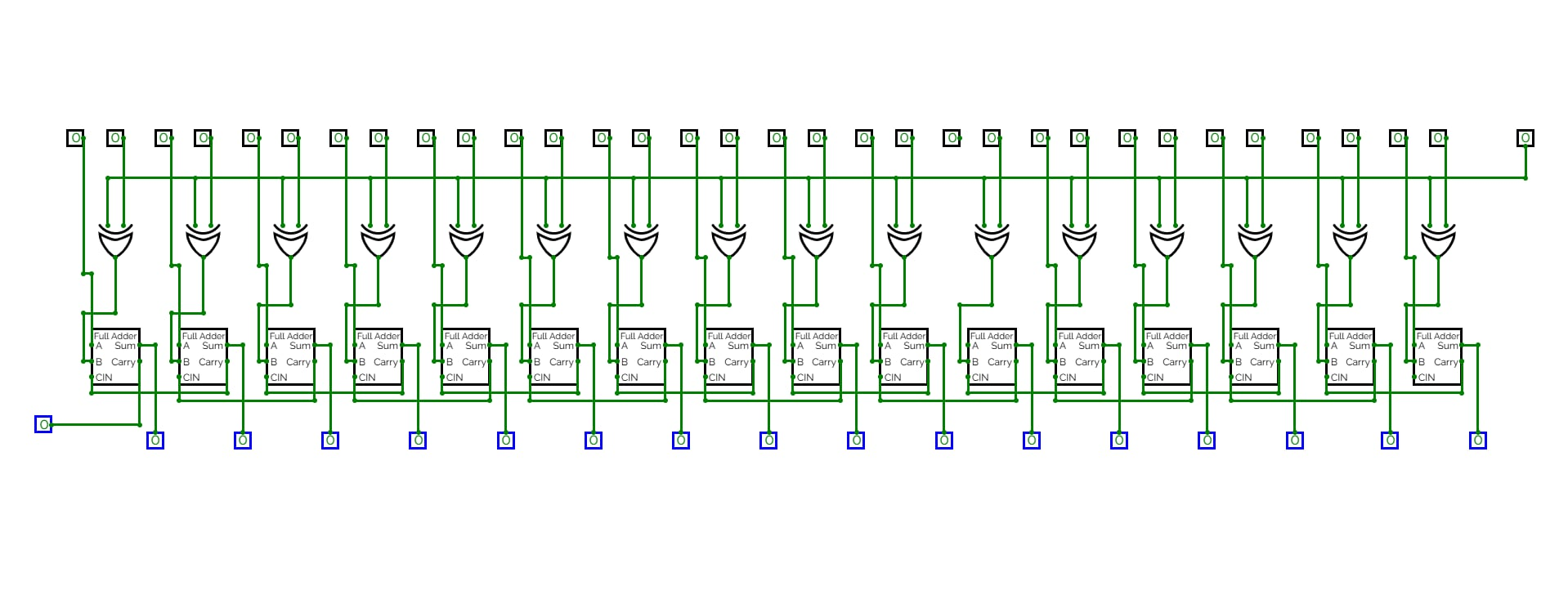
Circuit test record
All 12 test cases and the mode-switch check tested in CircuitVerse:
| Case | Mode | A | B | Expected result | Observed result | Expected status | Observed status | Pass/Fail |
|---|---|---|---|---|---|---|---|---|
| 1 | 0 (Add) | 0000 0000 1111 1111 (00FF) |
0000 0000 0000 0001 (0001) |
0000 0001 0000 0000 (0100) |
[From CircuitVerse] | Cout = 0 (No carry) | [From CircuitVerse] | [Pass/Fail] |
| 2 | 0 (Add) | 0000 0000 0000 0000 (0000) |
0000 0000 0000 0000 (0000) |
0000 0000 0000 0000 (0000) |
[From CircuitVerse] | Cout = 0 (No carry) | [From CircuitVerse] | [Pass/Fail] |
| 3 | 0 (Add) | 0000 0000 0000 1010 (000A) |
0000 0000 0000 0101 (0005) |
0000 0000 0000 1111 (000F) |
[From CircuitVerse] | Cout = 0 (No carry) | [From CircuitVerse] | [Pass/Fail] |
| 4 | 0 (Add) | 1111 1111 1111 1110 (FFFE) |
0000 0000 0000 0001 (0001) |
1111 1111 1111 1111 (FFFF) |
[From CircuitVerse] | Cout = 0 (No carry) | [From CircuitVerse] | [Pass/Fail] |
| 5 | 0 (Add) | 1111 1111 1111 1111 (FFFF) |
0000 0000 0000 0001 (0001) |
0000 0000 0000 0000 (0000) |
[From CircuitVerse] | Cout = 1 (Carry) | [From CircuitVerse] | [Pass/Fail] |
| 6 | 0 (Add) | 1111 1111 1111 1111 (FFFF) |
1111 1111 1111 1111 (FFFF) |
1111 1111 1111 1110 (FFFE) |
[From CircuitVerse] | Cout = 1 (Carry) | [From CircuitVerse] | [Pass/Fail] |
| 7 | 1 (Sub) | 0000 0000 0000 0011 (0003) |
0000 0000 0000 0101 (0005) |
1111 1111 1111 1110 (FFFE) |
[From CircuitVerse] | Cout = 0 (Borrow) | [From CircuitVerse] | [Pass/Fail] |
| 8 | 1 (Sub) | 0000 0000 0000 0000 (0000) |
0000 0000 0000 0000 (0000) |
0000 0000 0000 0000 (0000) |
[From CircuitVerse] | Cout = 1 (No borrow) | [From CircuitVerse] | [Pass/Fail] |
| 9 | 1 (Sub) | 0000 0000 0000 1001 (0009) |
0000 0000 0000 0100 (0004) |
0000 0000 0000 0101 (0005) |
[From CircuitVerse] | Cout = 1 (No borrow) | [From CircuitVerse] | [Pass/Fail] |
| 10 | 1 (Sub) | 1010 1010 0101 0101 (AA55) |
1010 1010 0101 0101 (AA55) |
0000 0000 0000 0000 (0000) |
[From CircuitVerse] | Cout = 1 (No borrow) | [From CircuitVerse] | [Pass/Fail] |
| 11 | 1 (Sub) | 0000 0000 0000 0000 (0000) |
0000 0000 0000 0001 (0001) |
1111 1111 1111 1111 (FFFF) |
[From CircuitVerse] | Cout = 0 (Borrow) | [From CircuitVerse] | [Pass/Fail] |
| 12 | 1 (Sub) | 1111 1111 1111 1111 (FFFF) |
1111 1111 1111 1111 (FFFF) |
0000 0000 0000 0000 (0000) |
[From CircuitVerse] | Cout = 1 (No borrow) | [From CircuitVerse] | [Pass/Fail] |
| Mode-Switch | 0 → 1 | 0000 0000 0000 1000 (0008) |
0000 0000 0000 0011 (0003) |
000B → 0005 |
[From CircuitVerse] | Cout = 0 → Cout = 1 | [From CircuitVerse] | [Pass/Fail] |
Worked examples
Example 1: addition, 00FF + 0001 (Test Record Case 1)
- Mode M = 0 (add)
- A 0000 0000 1111 1111 (hex 00FF, decimal 255)
- B 0000 0000 0000 0001 (hex 0001, decimal 1)
- Expected 0100, carry 0
- Observed 0100, Cout = 0
- Meaning 255 + 1 = 256. It fits in 16 bits, so there is no carry.
Example 2: subtraction, 0003 - 0005 (Test Record Case 7)
- Mode M = 1 (subtract)
- A 0000 0000 0000 0011 (hex 0003, decimal 3)
- B 0000 0000 0000 0101 (hex 0005, decimal 5)
- Expected FFFE, borrow 1
- Observed FFFE, Cout = 0, so there is a borrow
- Meaning FFFE is 65,534. 65,534 - 65,536 = -2, which is 3 - 5. The borrow shows that A is less than B.
Open the live circuit
The project is set to Public, so you can run it without signing in.
Input checker
Enter exactly 16 binary digits (only 0 and 1) in each field. Keep the leading zeros. This page only checks your entries. CircuitVerse does the calculation.